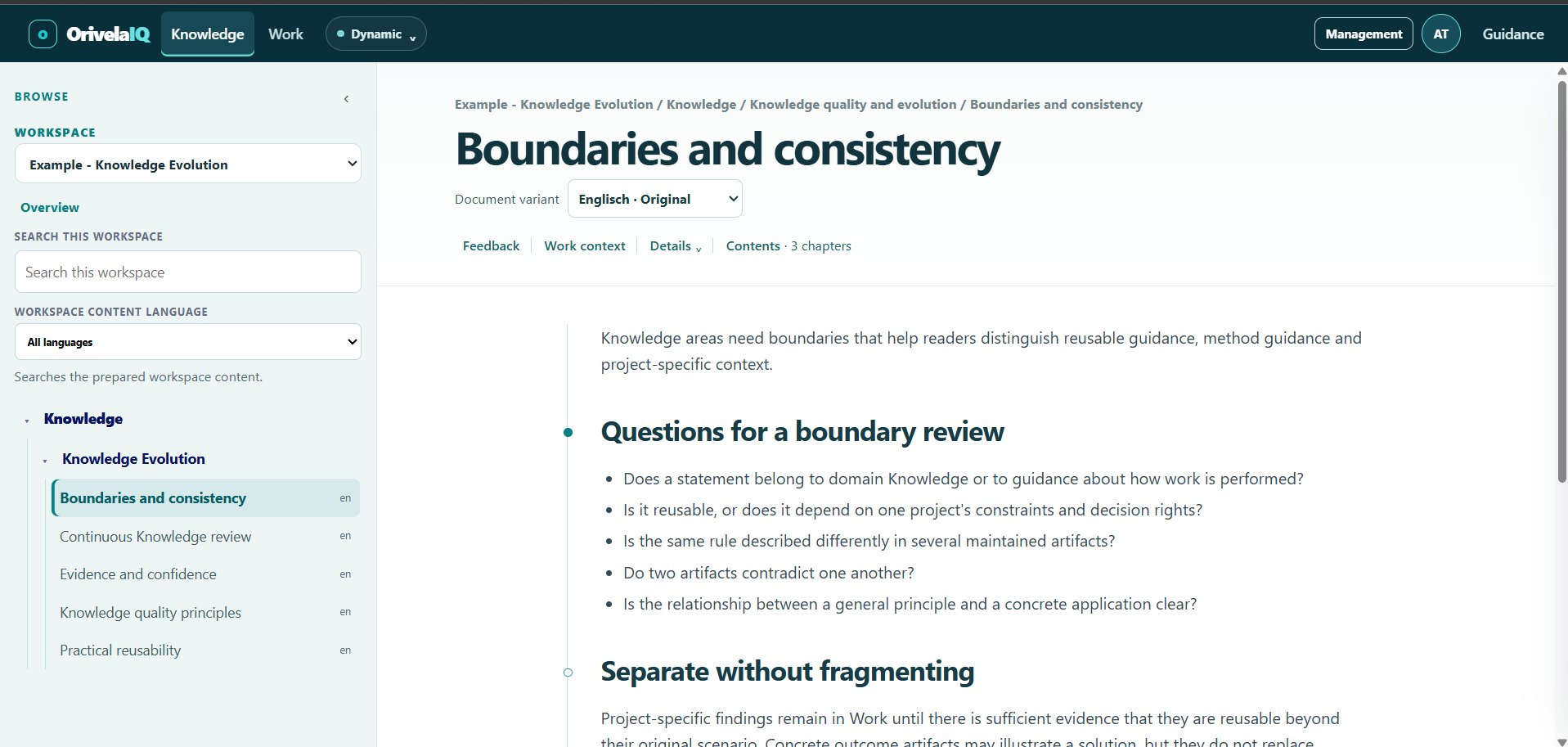
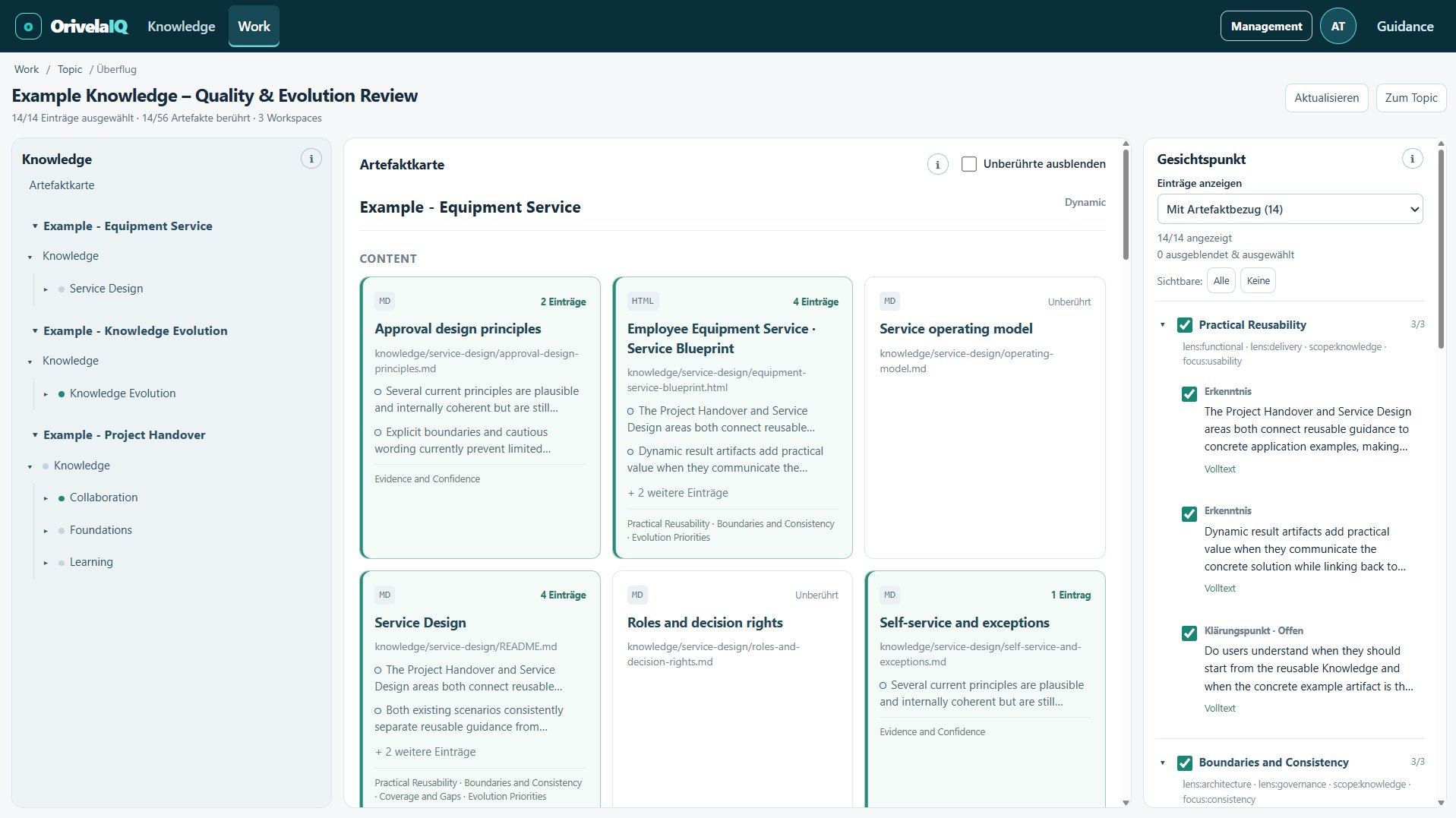
Four parts that belong together: Knowledge as the maintained state, feedback with answers, Work as shared clarification – and an AI that may use all three with your permissions and writes into your Home. Here with real product views and the terms you will meet in the product, each in one sentence.
Knowledge
The maintained state – readable, findable, in context.
Your content lives in your own files: text documents, graphics, interactive pages. OrivelaIQ shows them as connected knowledge with navigation, search and language variants. On the article you see what it rests on, what is open about it – and you can give feedback right on the paragraph.
WorkspaceA knowledge area with its own membership and roles – who sees what, who may do what.
SourceThe place where your content actually lives and is maintained – your Home at OrivelaIQ or your own GitHub repository.
IndexOrivelaIQ's prepared view of the source. A run publishes a complete, validated state – or nothing at all: if it fails, the last good state stays visible.
SearchFinds within the prepared state of a workspace – fast, and only in what you are allowed to read.
One fixed state everyone can rely on. One working edition that moves on.
Knowledge changes, but not every change should apply to everyone immediately. So a workspace can have two reading states: the working edition (Dynamic), which advances with every successful update, and a fixed state (Stable), which a responsible person sets deliberately. Once a fixed state is set, people and AI read it by default.
Dynamic – the working editionAlways the latest successfully prepared version of the source.
Stable – the fixed stateExactly one chosen, immutable version. It is not updated; it is deliberately replaced.
No silent switchingWhoever reads the fixed state never unknowingly gets newer content. The AI, too, refers to the exact version it read.
Your own namesCall the reading states whatever fits – say “Approved” and “In progress”.
Feedback stays attachedEvery piece of feedback knows which reading state it refers to.
OrivelaIQ Home
The place for your state – and an AI that writes along.
OrivelaIQ does not own your knowledge: it reads it from a source, prepares it and displays it. Until now that meant you need a source and someone to maintain it. Home takes the setup off your hands – and your AI takes over the writing. Home is the source OrivelaIQ runs for you: created with one click, with its own workspace, without technical work, and with a write tool through which your AI writes decisions straight into the articles. Anyone who prefers to stay with their own GitHub can; both work side by side.
OrivelaIQ HomeThe OrivelaIQ-operated knowledge source of a person: a repository at OrivelaIQ (technically OIQ M.Git) with an automatically created workspace. One click creates it, the first preparation runs without further approval. Inside OrivelaIQ it is simply called Home – and you can export it at any time.
Write tool for the AIYour AI gets its own tool for Home, with its own, revocable approval. It writes into the working edition; what counts is your decision when you replace the fixed state.
Own sourceAlternatively a GitHub repository that belongs to you. You keep your tools and routines; OrivelaIQ only reads. Someone with technical knowledge sets it up – once.
What stays the sameReading, reading states, feedback, Work and permissions work identically either way. A workspace can connect several sources. Home is an option, not a requirement.
Why Home? Three questions a state otherwise hangs on
Where does our state live?
OtherwiseScattered across documents and chats – or you first build a source with GitHub.
With HomeOne click: the place is there, your workspace comes with it.
Who writes decisions down?
OtherwiseSomeone, sometime – usually nobody. The article goes stale, the decision stays in the chat.
With HomeYour AI, on one sentence – straight into the article.
And when the AI writes?
OtherwiseThen it is simply there – checked or not. That makes it risky to let an AI near your source.
With HomeIt writes into the working edition. It counts only when a person replaces the fixed state.
The loop closes: chat, entry, decision, Home, fixed state – with two gates. The AI writes, a person releases.
When Home – when your own source?
Home fits when …
you have no maintained knowledge source yet – or don't want to build one
you want to start without technical support
your AI should write content directly
you are an individual or small team sharing knowledge deliberately
Your own source fits when …
your knowledge already lives in a repository and is maintained there
review and release routines in GitHub should stay
several people write content (co-authors follow in Home)
you want to run the source in your own system
Both together work. Either way you need content as files (Markdown, SVG, HTML – existing material can be migrated) and one person who owns the state.
Status of Home: the first stage is implemented – create Home, own workspace, text articles, one owner, write tool for the AI, also with the free Claude tier. Graphics and interactive content, translations and co-authors in Home follow in the next stages.
Content
Formats, foundations and languages.
Formats
Text, graphics, interactive
Markdown text, SVG graphics and HTML pages from your source. HTML runs sandboxed with scripts disabled by default. A responsible person enables interactive content per source – it stays self-contained (no network, no tracking) and can lead to other articles or to search.
An interactive knowledge map is an article
External images, scripts or fonts are never loaded
Foundations
What a piece of content rests on
An article can declare in the source what it is grounded on. OrivelaIQ shows both: the foundations of a piece of content and the content it grounds in turn. So it stays traceable what changes when a foundation changes.
A unique identity per knowledge object, stable across renames
References resolve within the same source; unknown targets are shown as unresolved, never guessed
Languages
Translations with status
Original and translation belong together and stay distinguishable: which version leads, whether the translation is reviewed or approved, and whether it still matches the source or is stale. Readers choose their preferred language; the origin stays visible.
Status: draft, reviewed, approved
Currency: current, stale, unknown – separate from status
Feedback and answer
Feedback gets an answer, a decision and evidence.
Feedback is not the end, it is the start of a traceable path. Every comment stays where it belongs in the content – and everything that happens afterwards stays with it.
FeedbackOn the article or a section, optionally with explanatory material. That material doesn't become knowledge – it explains the feedback.
AnswerFrom someone on the team – or from outside: experts or an AI answer through a controlled exchange. Who answered stays visible: human, AI or tool.
DecisionWhat follows? No change, change required, or deferred. The decision triggers no change – it names it.
Change evidenceThe change is made in the source by the people responsible for it. The evidence is recorded with the decision.
VerificationSomeone confirms the change has landed. Only then is the feedback closed.
Feedback, a proposal or an answer – even a repeated one – never turns into knowledge that counts by itself. There is always a decision and a person in between.
Work
What is being clarified – separate from the state, but linked to it.
Not every question belongs in the maintained state right away. In Work you collect them in a topic: insights, points to clarify, decisions, results. Every entry can point to the knowledge it is about – with the exact reading state. From the article you get back to the open work.
TopicA work topic with entries, a working state and its own permissions: who leads it, who may contribute.
Four kinds of entryInsight, clarification point (open or closed), decision, result – each entry is recognisable as what it is, and stays that.
RelationsEntries can refer to each other: this decision answers that clarification point.
OverflightThe condensed state of a topic: which articles are touched, which entries belong to them, with a direct way to the knowledge.
Reference with reading stateAn article reference remembers whether it points to the fixed state or the working edition.
A decision in Work is initially a work entry. It does not automatically make the content binding – that is a deliberate step by the people responsible for the source.
Overflight of a topic: which articles are touched, which insights and open points belong to them.Enlarge ↗
Two ways work gets in
Directly in the product or through the connected AI. The same rules whether in the browser or via AI – every change is checked against current permissions and leaves a receipt.
As a prepared file. An external author or an AI without a connection prepares a topic as a portable file. A person imports it in three steps: Plan → Preview → Apply. Nothing is imported automatically, nothing is written to the source.
Connected
Your AI reads the state and contributes – with your permissions.
You connect your AI to OrivelaIQ once, much like a plug-in. From then on it can read your state – the fixed state or the working edition, named exactly – and, if you are allowed to, contribute to topics. The connection is yours: the AI can do exactly what you can, no more. Your current permissions are checked on every call.
MCPAn open standard for connecting an AI to approved tools. Several providers support it; OrivelaIQ is tied to no particular model and runs no AI itself.
Personal connectionOne connection per person, revocable individually at any time. Writing into Home is a separate approval of its own.
Permissions per callThe AI sees all tools, but may only execute what you are currently allowed to do in this workspace and topic.
ReceiptsEvery change by the AI leaves a receipt; an interrupted operation can be safely repeated without writing anything twice.
Writing to HomeFor Home your AI gets its own write tool – with its own, separate approval. It then changes content in the working edition, which you review and release afterwards. This works with the free Claude tier as well.
Read our state on critical customer feedback, classify this customer email and note what we need to clarify.
Your fixed state (“Approved”, March): Confirm right away, reply within 24 hours. The email concerns a partner customer – the topic has an open clarification point on whether the state applies to partners.not yet decided
I added a clarification point to the topic: “Partner customer case of 11 October”, referring to the article in the fixed state. I did not change the state itself.state unchanged · entry added
Illustration. What the AI may do depends on your permissions; the quality of every answer remains your judgement.
Access and roles
Three roles in the workspace. Separate rights in the topic. No password.
Role
May
Reader
read knowledge, search, choose reading states
Contributor
additionally give feedback
Manager
additionally manage the workspace's source, index and fixed state
Lead / contribute to a topic
Topic rights are independent of the workspace role: whoever leads a topic decides who contributes to it
Platform admin
manage users, workspaces and memberships
How you get in
Sign-in with a one-time code. You receive a code at your registered email address. There is no password that could get lost.
Permissions apply immediately. If a role changes or a connection is revoked, it takes effect on the next call – in the browser and for the AI.
Source credentials stay server-side. An AI writes only into your Home – with its own approval, which you can revoke at any time. Nobody gets write access to an own source such as GitHub through OrivelaIQ.
For AI and agents
The rules are public – for machines, too.
Public guidance
Without signing in, any AI can read how content, topics and answers must be structured – with examples and checksums. A complete offline transfer serves agents without network access. None of it grants access.
Changes you can read
Every release explains for people and agents what changes, for whom, and whether action is required. Machine-readable – so an AI doesn't fail on an outdated assumption.